
How do I Download and Install the Beta Version of Windows 11?
Table of Contents
What are the windows 11 beta version?
As we all know, Windows 11 was released on June 24th, 2021, but now it finally has its first beta for registered users within the Windows Insider Program. Earlier this month, Microsoft also released a developer preview of the later version of Windows.
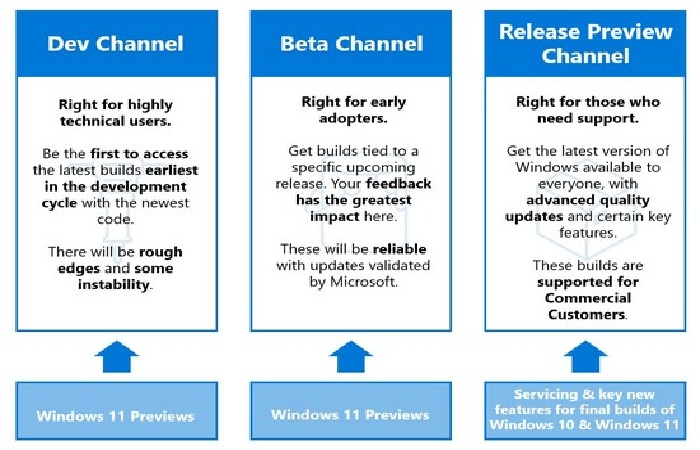
Although the beta version of Windows 11 is more stable than its predecessors, it contains many bugs so that it cannot be installed on the main PC. As Microsoft said, if you are registered with the Dec Channel, you will need to go back to the Beta Channel.
What is the Beta Version of Windows 11?
The Beta Version of Windows 11 is a pre-release build offered by Microsoft through its Windows Insider Program. It allows users worldwide to test upcoming features before the official public release.
Unlike the Developer Channel builds, the Beta Channel provides:
- More stability
- Fewer critical bugs
- Early access to new UI features
- Performance improvements
- Security updates testing
The Windows 11 Beta Version is ideal for:
- Developers
- IT professionals
- Tech enthusiasts
- Businesses testing compatibility
It is part of Microsoft’s phased release strategy to ensure smooth global deployment.
How to download Windows 11
Here’s how to download Windows 11 and run it on a PC. Microsoft Windows 11 is considered the most important update from Microsoft to its most popular operating system of all time, after Windows 10 in 2015.
When the launch was announced in June, it was followed by many developer previews, all of which were given out to users as part of the Windows Insider Program. This weekend, Microsoft put the spotlight on the spotlight by announcing the beta channel of its latest Windows 11 to insiders.
This means that Windows users can now test this Windows 11 on their PCs by downloading the beta version. If you are concerned about the stability of your computer by downloading its beta, don’t do so because its beta builds are more stable and fun for everyone.
Microsoft has deliberately omitted some features such as the new Teams integration in the current Windows beta version. We expect the company will add them to the operating system after fixing any remaining issues in the development pipeline.
How to Download and Install the Windows 11 Beta Version (Step-by-Step)
Quick Installation Checklist
- Join the Windows Insider Program
- Select Beta Channel
- Check for updates
- Download Beta Version
- Restart device
Installation Process Overview
| Step | Action | Time Required | Risk Level |
| 1 | Register Insider Account | 5 min | Low |
| 2 | Select Beta Channel | 2 min | Low |
| 3 | Download Build | 20–40 min | Medium |
| 4 | Installation | 15–30 min | Medium |
| 5 | Restart & Setup | 10 min | Low |
Official Insider Program:
https://insider.windows.com
Official Windows 11 Overview:
https://www.microsoft.com/windows/windows-11
First beta version
Windows 11 has released its first beta version for users who are part of the Windows Insider Program. Microsoft’s new Windows 11 operating system was announced last month, followed by the Developer Update Preview.
Microsoft stated that the beta version is part of the beta channel as it brings many features and improvements to the operating system. Also, this version offers more stability compared to the previous preview, although it contains several bugs. So make sure you want to download them to your computer or pc.
Microsoft says, “Windows 11 Insider Preview Build 22000.100 is available to everyone in the development channel. However, those on the Developer Channel were advised to switch to the Beta Channel for more stable builds. ”
Windows 11 Beta Version System Requirements
Below is a simplified global compatibility table:
Minimum System Requirements
| Component | Minimum Requirement | Why It Matters |
| Processor | 1 GHz, 2 cores, 64-bit | Required for performance |
| RAM | 4 GB | Smooth multitasking |
| Storage | 64 GB | OS installation space |
| TPM | TPM 2.0 | Security encryption |
| Graphics | DirectX 12 compatible | UI & gaming support |
| Firmware | UEFI + Secure Boot | Modern boot security |
| Display | 720p (9” screen) | Visual compatibility |
These requirements ensure your PC can safely run the Beta Version.
Latest Microsoft operating system
If you want to try the latest Microsoft operating system, follow the steps below but be aware of the bugs in this new beta release. Firstly, make sure you have a compatible tablet or PC. If your device is compatible with Windows 10, it doesn’t need to be able to run it.
To see this, go to the System Requirements For The Latest Version Of Windows section and see if your PC meets these requirements. Only then can you move forward. It is already in beta testing, anyone can download and run this new beta version of it right now. However, there are a few minimum requirements to install its Beta:
Processor:
1 gigahertz (GHz) or faster with 2 or more cores in a compatible 64-bit processor or system-on-a-chip (SoC)
Storage:
64 GB or larger storage device
Internet connection and Microsoft accounts: Windows 11 Home Edition requires an Internet connection and Microsoft account to complete the device set up the first time you use it.
System firmware:
UEFI, safe boot function
Display:
Collection of high definition (720p) over 9 ″ diagonals, 8 bits per color channel
TPM:
Trusted Platform Module (TPM) Version 2.0
RAM:
4 gigabytes (GB)
Graphics card:
DirectX 12 or higher compatible with WDDM 2.0 driver
Windows 11 Beta Version Pricing in 5 Top Countries
The Beta Version itself is free, but you must have a valid Windows license.
Windows 11 License Cost by Country
| Country | Estimated Price | Currency | Where to Buy | Online App |
| USA | $139 | USD | Microsoft Store | Microsoft Store App |
| UK | £119 | GBP | Microsoft UK | Microsoft Store |
| India | ₹10,999 | INR | Microsoft India | Amazon India |
| Canada | CAD 189 | CAD | Microsoft Canada | Best Buy |
| Australia | AUD 199 | AUD | Microsoft AU | JB Hi-Fi |
Windows 11 Beta Version vs Stable Version Comparison
Feature Comparison
| Feature | Beta Version | Stable Version |
| Stability | Medium | High |
| Bugs | Possible | Minimal |
| New Features | Early Access | Official Release |
| Security | Updated | Fully Tested |
| Recommended For | Testers | General Users |
Windows 11
It has received a makeover from Microsoft, along with several great features and operating system performance improvements. However, Microsoft announces that older computers cannot upgrade to them if they do not meet the minimum requirements above.
The same rule applies to the newly released beta version. According to reports, it will be months before the original, stable, out-of-the-box version of it is available. Still, users can meet their needs today with the latest Windows 11 in beta if they purchase a valid Windows license.
Steps
Here are the steps to install it Preview Build 22000.100 on your PC or tablet:
- Primarily, take part in the Windows Insider Program. To do this, go to Settings> Update & Security
- Then register your Windows account in the Windows Insider Program. This message gives you the opportunity to register. Click on it.
- Another message will open giving you some details about the Windows Insider Program. Click on Sign In.
- Please read it carefully, then click Accept the terms of the agreement and click Submit.
- Then click Close on the text message.
- The registration procedure will now begin and you will need to link your account, select the Link Account option, decide which version you want to connect to, and tap the Next button.
- After that, select the channel you want to join, although Microsoft recommends the beta channel. Finally, click on Confirm when you have decided and in the next message click on Confirm again.
- When you did, restart your PC by selecting Restart Now.
- Go back to Settings> Update & Security and click Check for Updates.
- Your latest beta version of Windows 11 should now download.
- Wait for it to fully download and wait for it to install.
- Once you did, you will see the option to Restart Now. Click on it.
- It starts booting in it.
Method
There is an alternative method to check that your PC or tablet is compatible with the Microsoft beta version of it. There are two steps: first, you need to download the latest version of WhyNotWin11, an automated script that will detect if your Windows PC has the correct CPU, hard drive space, and enough RAM, among other security components for it.
Then run this script and wait for the results to load. Green squares should indicate a Windows 11 compatible feature, while an orange square with a question mark is an unknown value. If you get a red square, it means that your device is likely not compatible with the new beta version.
Key Benefits of Installing the Beta Version of Windows 11
Top Advantages
- Early access to features
- Modern redesigned UI
- Improved multitasking (Snap Layouts)
- Enhanced gaming support
- Better security architecture
The Beta Version allows users globally to experience innovation before the official rollout.
Global Adoption Trend of Windows 11 Beta Version
(Insert simple bar graph showing adoption growth from launch month to present.)
Suggested Data Format:
| Month | Insider Downloads (Estimated) |
| Month 1 | 1M |
| Month 3 | 3M |
| Month 6 | 6M |
| Month 12 | 12M |
Is It Safe to Install the Windows 11 Beta Version?
While the Beta Version is more stable than Developer builds, it may include:
- Minor performance issues
- Driver incompatibility
- Occasional feature glitches
It is recommended to install it on:
- Secondary devices
- Virtual machines
- Test environments
Not recommended for mission-critical systems.
